Most apps in this category build around one card format and stop there. This one doesn’t, and that single fact — confirmed on the operator’s own landing page rather than assumed from the app’s name — shapes almost everything else worth knowing about it, starting with what you’re actually installing before you even get to the file size.
What’s Actually Inside 3 Patti District
The operator’s own promotional page markets this app under a heading that reads “Top Teen Patti & Dragon Tiger APK Download Pakistan” — two genuinely different games bundled into a single install, not one game with a second mode tacked on as an afterthought.
Teen Patti is the game this whole category takes its name from: three cards dealt to each player from a standard 52-card deck, with betting rounds where you can play blind without looking at your hand, look and bet once you’ve seen your cards, or fold out entirely. Whoever holds the strongest three-card hand once everyone else has folded, or wins a final two-player showdown, takes the pot. It rewards reading how other players are betting almost as much as it rewards the cards you’re actually holding.
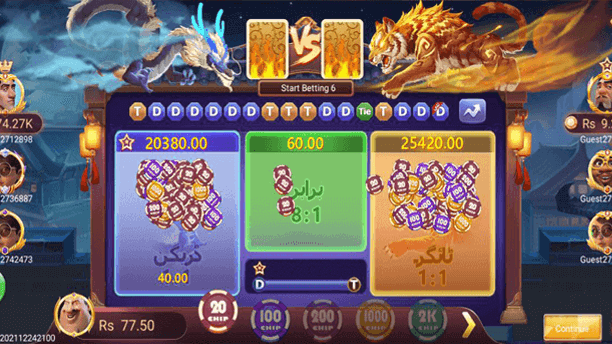
Dragon Tiger is a different kind of game entirely. One card goes to a position called “Dragon,” one to a position called “Tiger,” and the only decision is which of the two will come out higher — no hand-building, no betting rounds, no choices once your bet is placed. It’s closer to a coin flip with better odds framing than to a card game in the Teen Patti sense, and rounds resolve in seconds. That speed is exactly why apps in this category like to pair it with something slower like Teen Patti — it gives you something quick to do between longer hands.
Knowing the split matters practically. If you install this expecting only the slower, strategic style Teen Patti offers, Dragon Tiger’s presence might catch you off guard, and the reverse is true if you came purely for a fast game and land on a Teen Patti table instead.
The Real File Specs
Here’s what the file itself actually reports, checked directly against the operator’s current server: 20,093,164 bytes, or 20.1 MB, needing Android 5.0 or newer to install.
One field is deliberately left blank here rather than filled with a guess: version number. The operator’s own site doesn’t print a genuine version number anywhere in its own materials, and rather than repeat an unverifiable figure purely to make the listing look complete, the confirmed server build date — 2 May 2026 — stands in as the freshness signal instead. A blank field that’s honest about what isn’t known is more useful than a filled-in one that isn’t actually true.
A Small Discrepancy Worth Flagging
The APK’s own filename encodes a build date of 8 April 2026. The server actually delivering that file reports a Last-Modified date over three weeks later, on 2 May. Whatever changed in those three weeks never made it into the filename, which still reads like an April build even though the file behind it has clearly moved on since.
This kind of mismatch is worth actively checking for across this entire app category, not just here, because of how each figure is generated. A filename gets written once, at the moment a build is packaged, and never changes again regardless of what happens to the file afterward — an operator could swap the file behind that same name a dozen times and the filename would never reflect it. A server’s Last-Modified header, by contrast, updates automatically every time the underlying file actually changes, with no manual step involved. That makes the header the more honest freshness signal whenever the two disagree, and it’s why this page trusts 2 May over the 8 April date baked into the file’s own name.
Who’s Actually Behind This App
Here’s something that doesn’t appear anywhere in this app’s own marketing. On at least one third-party listing carrying this exact app, the developer field attached to it reads “3Patti Pearl Studios” — the same studio name associated with a completely different app in this category, 3 Patti Pearl. Whether that reflects one company genuinely operating both apps under a shared studio label, or a listing site simply reusing a developer name across entries without checking it first, isn’t something that can be settled purely by looking from the outside.
It’s worth explaining why a detail like this matters rather than just flagging it and moving on. Building a real-time multiplayer card platform from scratch — server infrastructure, anti-cheat systems, payment processing, customer support — is expensive to do once. Once that groundwork exists, launching a second app under different branding is comparatively cheap: new front-end, new marketing site, often running on the same or closely related backend underneath. That’s the most likely explanation if the shared studio label is genuine rather than a listing error. Both explanations stay plausible without independently confirming company registration details behind each app, so this is reported as exactly what it is — a real, checkable detail from how the app is catalogued elsewhere, not a settled conclusion.
Getting It Installed
Tap the download button and let the 20.1 MB file finish saving completely before doing anything else with it — on a slower connection that’s a minute or two, not a sign anything has stalled. Once it’s done, open it from your notification shade, or find it directly in your Downloads folder if that notification has already cleared.
Android will very likely ask permission to install from this source the first time, since the file didn’t arrive through the Play Store. That’s a standard system-level prompt attached to any file installed this way, not a warning specific to this app. Grant the permission to whichever app opened the file — typically your browser or file manager — under Settings, then Apps, then Special app access, then Install unknown apps.
Once granted, return to the install prompt and complete it. Given the developer-name mismatch covered above, confirming what actually landed on your phone before opening it is a genuinely worthwhile habit here rather than boilerplate caution — check that the installed icon and name read “3 Patti District” before tapping it open. Give the app a little extra time on first launch too, since it’s connecting to the server and pulling in both game modes for the first time, which is noticeably slower than every session after it.
If Something Doesn’t Work
“Installation blocked” or “app not installed” almost always means the unknown-sources permission is still switched off for whichever app you’re using to open the file — check that setting following the steps above and try again. A download that stalls or restarts partway through is usually a connection issue rather than a problem with the file itself; switching between Wi-Fi and mobile data and restarting the download from scratch clears this up more reliably than trying to resume a partial file.
If your phone reports insufficient storage, remember the installed app takes up more room than the raw 20.1 MB download once Android unpacks it and the app caches data for both game modes after first launch — freeing 200 to 300 MB beforehand covers this comfortably. If the app installs but won’t open or crashes immediately, that usually points to a download that didn’t finish cleanly rather than a genuine app problem; uninstall completely, delete the old file, and pull a fresh copy.
One issue specific to this app’s two-game structure: occasionally the Dragon Tiger table won’t load, or only Teen Patti tables appear, right after installing. This tends to happen when one game mode finishes connecting to the server before the other does on first launch. Giving it a minute, or backing out to the main menu and back in, usually clears it without needing to reinstall anything.
Making Sure You Landed on the Right App
Given the developer-label mismatch already covered, a couple of habits are worth applying specifically here rather than treating this like a single, cleanly-attributed download. Check the installed icon and app name against what’s described here before opening it — a mismatch is the clearest sign something other than the intended app landed on your device. If a download button routes through more than one redirect before reaching an actual file, that’s ordinary for this category rather than automatically alarming, but it’s worth noticing where you actually land rather than assuming every click leads straight to the expected file. And be skeptical of any other listing quoting a meaningfully different file size than 20.1 MB for this exact app, since that’s usually a sign of a page that copied a figure rather than checking it.
iPhone and PC Availability
There’s no working iOS download for this app currently. The operator’s own install script does include a code branch specifically meant to handle iPhone visitors, but it never actually assigns anywhere for the browser to go — tapping download on an iPhone right now does nothing at all, rather than producing a visible error that would at least tell you clearly something’s unavailable. There’s no official PC client either, and no browser-playable version. Android remains the only platform this operator currently delivers a working file to.
Two Games in One App: Worth Weighing
The bundled structure is worth thinking through directly rather than assuming more is automatically better. An app that only offers Teen Patti gives that one format its complete focus — every update, every server resource, every piece of attention goes toward one game. An app bundling Teen Patti and Dragon Tiger together is, by definition, splitting development and server resources across two different game types instead.
Neither approach is inherently the better one. It comes down to whether you actually want both games available in a single install, or would rather have an app doing one thing well without a second game type competing for the same resources and screen space. At 20.1 MB, this app is also on the lighter side for what it covers — several single-game competitors in this category run considerably larger for a narrower feature set, which is a genuine point in its favor if storage or download time on a slower connection matters to you.
It’s also worth considering how a bundled app tends to get updated over time compared to a single-game one. A developer maintaining two game modes inside one app has to balance attention between both whenever they push an update, which can mean slower iteration on either game individually compared to a competitor pouring every update cycle into just one format. That’s speculation about typical development patterns rather than a confirmed fact about this specific operator, and it’s offered here as context for weighing the trade-off, not as a claim about how this particular app is actually run.
How Bonuses and Rebates Typically Work in This Category
Without repeating any specific figure this guide can’t verify for this exact build, it’s worth understanding the general shape of how apps like this usually operate, since it sets reasonable expectations before you install one. Most combine an in-app balance funded through standard local payment methods with periodic incentive structures — activity-based bonuses, rebates on losses over a set period, referral rewards for bringing in other players. The specific terms and percentages vary considerably between operators and change over time even within a single app, which is exactly why this guide doesn’t print numbers it hasn’t independently confirmed for this particular build. If a screen inside the app itself states a specific figure, that’s the number worth trusting over anything printed on a third-party page, this one included.
Do Hacks or Predictors Work for Either Game?
No, for a reason that applies equally to both game modes bundled here. In Teen Patti, each round’s cards and the resolution of every decision are processed on the operator’s own server, with your phone receiving and displaying an already-decided result — there’s no local calculation running on the device for a hack to intercept. In Dragon Tiger the situation is even more clear-cut: a single card decides the entire round, generated server-side, leaving nothing for a “strategy” tool to meaningfully act on beyond the bet itself.
In practice, this means anything sold as a hack, mod, or predictor for either game inside this app is either simply non-functional, or its actual purpose has nothing to do with predicting or altering anything at all. The more consistent pattern across this category is that such tools’ real function is reading whatever data they can off the phone they get installed on, while doing nothing to the game itself. Treat any file offered outside this app’s official download channel and described as a way to win more reliably with the same caution you’d extend to an unsolicited file from a stranger.
General Safety Before Installing Any APK
A few habits apply to any APK install in this broader category, not just this one. Only download from a source you’ve checked yourself rather than trusting a button because the page around it looks polished. Pay attention to what permissions the app requests once installed, and question anything that doesn’t obviously fit what a card game needs to function. Keep your phone’s operating system reasonably current, since security updates close off some of the ways a tampered or repackaged file can cause harm. And if anything about the app’s behavior feels off after installation — permission prompts that don’t add up, unusual battery drain — trust that instinct over assuming a completed install means everything’s fine.
Frequently Asked Questions
What is the real file size of the 3 Patti District apk download?
20,093,164 bytes, or 20.1 MB, confirmed directly from the operator’s current server.
Does 3 Patti District cover more than one game?
Yes — the operator’s own landing page markets it as covering both Teen Patti and Dragon Tiger in a single install.
What’s the difference between Teen Patti and Dragon Tiger in this app?
Teen Patti is a multi-round betting game built around three-card hands. Dragon Tiger is a single-card, single-bet game that resolves almost instantly, with no hand-building involved.
Why isn’t a version number listed for this app?
The operator doesn’t publish a genuine one in its own materials, so the confirmed server build date is used instead of printing an unconfirmed guess.
Why does the filename say April but the server says May?
The file’s name encodes an 8 April 2026 date, but the server’s own header reports 2 May 2026 as the last update — the header is the more reliable of the two since it updates automatically and the filename doesn’t.
Is 3 Patti District connected to 3 Patti Pearl?
A third-party listing attaches the developer label “3Patti Pearl Studios” to this app, though that connection isn’t independently confirmed beyond how it’s catalogued there.
Is there an iOS version of 3 Patti District?
No. The operator’s install script has an unfinished iPhone branch that doesn’t lead anywhere.
Can I play 3 Patti District on PC?
There’s no official PC client at this time, and no browser-based version either.
What should I do if installation gets blocked?
Enable the “install unknown apps” permission for your browser or file manager in your phone’s security settings, then try again.
Why does only one game mode load when I first open the app?
Occasionally one mode finishes connecting to the server before the other does on first launch. Waiting a minute, or backing out to the main menu and back in, usually clears it.
How much free storage should I leave before installing?
At least 200 to 300 MB beyond the 20.1 MB download itself, since the installed app takes up more room once Android unpacks it and both game modes cache their own data after first launch.
Should I trust a bonus or rebate percentage I saw on another site for this app?
Not without checking it inside the app itself first. Terms in this category vary between operators and change over time, and a number printed on a third-party page — including this one — is worth less than what the app currently states on its own screens.
Final Thoughts
What makes this download worth a closer look isn’t just the confirmed file size, though that’s checked directly rather than copied. It’s the two things digging past the marketing turned up: a filename that quietly disagrees with the server actually hosting the file by three weeks, and a developer label elsewhere that ties this app to a completely different one in the same category. Neither is visible from the operator’s own promotional page, and both are exactly the kind of detail that only surfaces when someone checks the file and its surrounding listings directly instead of repeating what the landing page says about itself.
Whether the studio-label connection changes how you think about this app is a judgment call, but it’s better to have that context going in than to find it out afterward from somewhere else. The same applies to the two-game structure itself — know what you’re actually installing before you tap download, not after.