Search around for this app and most pages read like the same marketing paragraph copied forward with the year changed. One older listing for this exact app — the same one this guide checked against — leans entirely on vague lines like “win big” and “premium luxury experience” without a single number you could actually verify. This guide takes the opposite approach: every figure below comes straight from the app’s own current listing, checked today, and where a claim can’t be verified it’s labeled as such rather than repeated anyway.
What 3 Patti Pearl Is
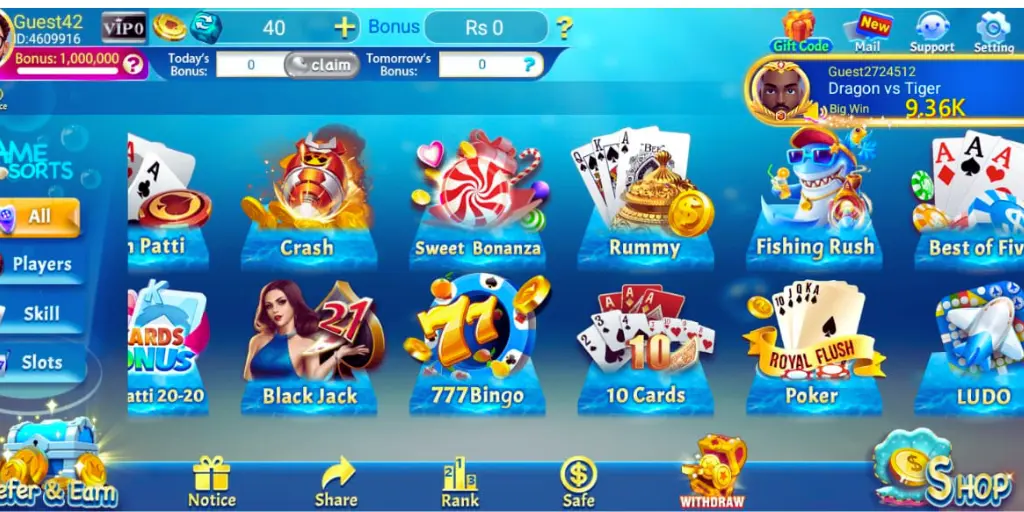
3 Patti Pearl is a mobile version of Teen Patti, the South Asian card game played with a standard 52-card deck and three cards dealt to each player. Everyone antes in, cards go out face down, and each player chooses to play blind, look and bet, or fold — the strongest hand left standing, or the winner of a final showdown, takes the pot. The app wraps that structure in a pearl-and-gold visual theme and runs it across real-time multiplayer tables instead of a single group sitting around one deck.
That’s the entire mechanical core of it. Everything else — the visual polish, the lobby design, the account system — sits on top of the same basic three-card game that’s been played at physical tables for generations.
For anyone newer to the game, the hand rankings underneath every round run, from strongest to weakest: a Trail (three cards of matching rank), a Pure Sequence (three consecutive cards, one suit), a Sequence (three consecutive cards, mixed suits), a Color (three same-suit cards out of order), a Pair, and finally a High Card, where the highest single card settles it when nothing else applies. None of that changes because a server is dealing instead of a person — it’s the same ranking order that decides every showdown, whether you’re sitting at a physical table or tapping through rounds on a phone screen.
The Real Specs, Checked Against the App’s Own Listing
Rather than repeat a number some other page printed, here’s what 3 Patti Pearl’s own current listing actually states: version 9.3, last updated 16 February 2026, a 35.2 MB download, and a package identifier of Com.3Patti.Pearl. It’s categorized under Games, platformed for Android only, and listed as free to install.
These are the figures the listing itself displays today, checked directly rather than pulled from a search snippet or a competing page’s guess. If you see this app listed elsewhere with a meaningfully different version number or file size, that’s worth treating with the same skepticism this guide applies to every other unverified claim floating around this category.
A 35.2 MB install puts this app on the lighter side of what’s typical for the category — plenty of comparable Teen Patti apps run past 45 or even 60 MB once you account for bundled game modes and higher-resolution art assets, so a smaller download here likely means either a leaner initial asset set, more content streamed in after install rather than bundled upfront, or simply tighter compression on the developer’s part. None of those explanations can be confirmed without opening the file itself, which sits outside what this guide checks — the honest takeaway is just that 35.2 MB is real and verified, and it’s smaller than a lot of the competition.
The version number is worth a second look too. 9.3 reads like a build that’s gone through a meaningful number of iterations already, which is a mildly reassuring signal in a category where plenty of apps sit permanently at 1.0 regardless of how many times the underlying file actually changes. It’s not proof of active development on its own, but paired with a February 2026 update date, it suggests this listing is being kept current rather than left untouched.
Why the Old Marketing Copy for This App Isn’t Worth Trusting
Here’s something worth being upfront about rather than glossing over. An earlier version of this exact app’s own listing page was built around generic promotional language — phrases like “Pakistan’s most trusted premium Teen Patti game,” “win big daily,” and “ultimate luxury experience” — the kind of copy that could describe literally any app in this category with the name swapped out. None of it was a verifiable fact, and none of it told you anything you couldn’t have guessed before reading it.
That’s a pattern worth recognizing across this entire category of app, not just here: generic superlative language (“best,” “most trusted,” “premium,” “ultimate”) is a sign a page is filling space rather than reporting something checked. This guide replaces that kind of copy with the version number, file size, update date, and package name actually shown on the listing — plain facts you can compare against what you see when you visit the page yourself.
It’s a useful filter to apply to any page in this category, not just this one. Read a paragraph and ask whether the same sentence, with only the app’s name swapped out, would fit equally well on a totally unrelated app’s page. If the answer is yes, that paragraph isn’t telling you anything specific about the app you’re actually looking at — it’s filler dressed up as a description. A sentence naming an exact version number, a specific file size, or a specific update date fails that swap test, because it stops being true the moment you paste it onto a different app. That’s the difference between the two paragraphs at the top of this section, and it’s worth carrying with you past this one page.
You’re Not Landing on an Isolated Page
Worth flagging before getting into the install steps: the page hosting this app’s download button also surfaces a “you might also like” list of several dozen other card and casino-style apps, all with similar pearl-and-gold or jewel-toned icons sitting in a grid. This app doesn’t live on a single-purpose page built around it alone — it’s one entry inside a much larger directory of similar-looking titles.
That’s a useful thing to know if you ever arrive at this download page through a shared link, a forwarded message, or a bookmark rather than typing the app name in yourself, since a long grid of similarly-styled icons is exactly the kind of layout where it’s easy to tap the wrong tile without noticing. Before you tap download, take the extra second to confirm the app name and icon in front of you actually say “3 Patti Pearl” rather than one of the many neighboring entries on the same page.
Getting It Installed
Since this isn’t distributed through the Google Play Store, Android treats it with a bit more caution than a store install by default, and that shows up as one extra permission prompt along the way. Start the download and give the 35.2 MB file time to finish completely — on a slower connection that might take a minute or two, which is normal rather than a sign of a stalled transfer.
Once it’s done downloading, open it either from the notification that appears or by finding it in your Downloads folder through a file manager app. Android will most likely ask permission to install from this source, since the file didn’t come through the Play Store — this is a standard system prompt attached to any APK installed this way, not a warning specific to this app. Grant the permission to whichever app opened the file (typically your browser), usually found under Settings, then Apps, then Special app access, then Install unknown apps.
With that granted, return to the install screen and finish the process. Before opening the app for the first time, take a second to confirm the icon and name on your home screen actually read “3 Patti Pearl” — a fast check that costs nothing and rules out any confusion with a similarly-named app elsewhere in this crowded category.
When Something Goes Wrong
A blocked install or an “app not installed” message almost always traces back to that unknown-sources permission not being switched on yet for whichever app you used to open the file — go back and check it following the steps above. A download that keeps stalling or restarting is more often a connection problem than anything wrong with the file itself; switching between Wi-Fi and mobile data and restarting the download from scratch clears this up in most cases.
If your phone tells you there isn’t enough storage, remember that the installed app takes up noticeably more room than the raw 35.2 MB file once Android unpacks it and the app caches additional data after your first launch — clearing 150 to 200 MB of free space beforehand is usually enough of a buffer. And if the app installs but crashes on opening or won’t launch at all, that’s typically a sign the install itself didn’t finish cleanly. Delete both the app and the downloaded file, then pull a fresh copy rather than trying to repair what’s already there.
Platform Availability
3 Patti Pearl’s own listing shows Android as the only platform tag attached to this app — no iOS listing, no PC client, no browser-playable version anywhere on the page. That’s a more limited check than this guide runs for apps where a full download script gets traced line by line, so treat “Android only, as far as the listing itself shows” as the honest boundary of what’s confirmed here rather than a definitive claim about what may or may not exist somewhere else entirely.
If you’re specifically hunting for an iPhone or PC version of this app, the safest assumption based on what’s actually verifiable right now is that one isn’t officially offered.
Payment Methods Listed for This App
One detail worth mentioning because it’s specific to this app rather than boilerplate copied from elsewhere in the category: the listing references support for JazzCash and EasyPaisa alongside bank transfer for moving funds in and out of the app. Both are widely used mobile payment services in Pakistan, and their presence here is a genuine, checkable detail rather than a vague promise — though this guide didn’t independently test a deposit or withdrawal to confirm how smoothly either option actually works in practice, and that’s worth knowing before assuming it’s frictionless.
Supporting both JazzCash and EasyPaisa rather than just one puts this app ahead of some competitors that only integrate a single payment provider, which can be a genuine inconvenience if that’s not the service you already use day to day. Bank transfer as a third option adds a fallback for anyone who’d rather not route funds through a mobile wallet at all. None of this is a claim about speed, fees, or minimum amounts, since the listing itself doesn’t spell those out and this guide isn’t in a position to test them — it’s simply a note on which payment rails are supported, which is a smaller and more honest claim than most competing pages make about the same subject.
What the Download Counter Actually Means
The listing currently shows 2,056 downloads next to this app. Worth being clear about what that number is and isn’t: it’s an internal counter tracked by this specific listing page, not a Play Store install count or any kind of independently audited total. A low or modest-looking number here doesn’t necessarily mean the app itself has few real users — it may just mean this particular listing page is one of several places the app is distributed from, each tracking its own separate count. Treat it as a rough, page-specific signal rather than a definitive measure of the app’s actual popularity.
For comparison, apps distributed through the Play Store show a rounded, publicly visible install count that at least reflects one consistent counting method across the entire store. A number on an independent listing page like this one doesn’t come with that same baseline, so a direct comparison between the two isn’t really meaningful even when the raw digits look similar. Use it as one small data point among the others in this guide, not as the headline figure.
Who This App Might Actually Suit
Given the specs and payment support covered above, it’s worth being direct about who this download makes the most sense for rather than treating it as a fit for everyone equally. If a lighter download matters to you — a slower connection, limited storage, an older device — the 35.2 MB file size is a genuine point in this app’s favor compared to some heavier competitors in the same category. If JazzCash or EasyPaisa is already how you handle mobile payments day to day, having both supported directly removes a step other apps in this category sometimes force you through.
On the other hand, if what you’re looking for is a page that spells out deposit speed, fee structure, or exactly how withdrawals are processed, this app’s own listing doesn’t currently provide that level of detail, and this guide isn’t able to fill that gap without testing it directly. That’s a reasonable thing to want answered before committing real funds to any app in this category, and it’s worth seeking out directly — through the app’s own support channel, once installed — rather than assuming a download page will have already covered it.
Why Hacks and Predictors Don’t Work Here
Apps like this run as a client that talks to a server rather than computing outcomes locally on your phone. When a round is dealt, the result is decided on the operator’s server, and your device receives and displays the finished outcome rather than calculating it itself. That’s standard architecture across essentially every real-time multiplayer card app in this category, and it’s also the entire reason nothing sold as a “hack” or “predictor” for a game built this way can function as advertised — there’s no local calculation to intercept, and no pattern across independent rounds for a predictor to actually exploit.
In practice, tools marketed this way and distributed as unofficial APK files tend to have a different real purpose: reading whatever data they can off the device they’re installed on, while doing nothing to the actual game. Treat anything offered outside the app’s own official channel and pitched as a way to influence outcomes with the same suspicion you’d give an unsolicited file from a stranger.
Staying Safe With Any APK Install
A few habits apply here as much as to any file installed outside the Play Store. Only download from a source you’ve checked yourself rather than trusting a button because the page around it looks polished or ranks well. Pay attention to what permissions the app actually asks for once installed, and question anything that doesn’t obviously match what a card game needs to function. Keep your phone’s operating system reasonably current, since security patches close off some of the ways a repackaged or tampered file can cause damage. And if anything about the app’s behavior after installation feels off — permission requests that don’t add up, unexpected battery drain — trust that instinct rather than assuming a clean install means everything’s fine.
It’s also worth building the habit of re-checking a listing before every install rather than trusting a bookmark or a link saved from months ago. Version numbers, file sizes, and even which domain hosts a given app’s listing can change over time in this category, and a page you verified once isn’t guaranteed to still match what it showed then. A thirty-second recheck against the current listing costs far less than troubleshooting an install that turned out to be outdated or, worse, no longer the file you originally verified.
Frequently Asked Questions
What version of 3 Patti Pearl is currently listed?
Version 9.3, according to the app’s own listing, last updated 16 February 2026.
How big is the 3 Patti Pearl apk download?
35.2 MB, as shown directly on the current listing.
What’s the package name for 3 Patti Pearl?
Com.3Patti.Pearl, per the app’s listing details.
Does 3 Patti Pearl work on iPhone or PC?
Not based on what’s confirmed here — the listing shows Android as the only platform tag, with nothing indicating an iOS or PC version exists.
What payment methods does 3 Patti Pearl support?
The listing references JazzCash, EasyPaisa, and bank transfer, though this guide didn’t test either payment flow directly.
Is the download counter on the listing accurate?
It reflects that specific listing page’s own internal tracking, not an independently audited or store-wide total — treat it as a rough signal rather than a precise figure.
Do hacks or prediction tools work for 3 Patti Pearl?
No. Round outcomes are decided on the operator’s server before your device receives anything, leaving nothing local for a hack to read or a predictor to exploit.
What should I do if installation gets blocked?
Enable the “install unknown apps” permission for your browser or file manager under your phone’s security settings, then try again.
How much free storage should I have before installing?
At least 150 to 200 MB beyond the 35.2 MB download itself, since the installed app takes up more room than the raw file once Android unpacks it and the app caches data after your first launch.
Why does an older version of this app’s page use different marketing language than this guide?
Because that older copy was built around generic promotional phrasing rather than checked facts — this guide deliberately replaces that kind of language with figures pulled directly from the current listing instead.
Is 3 Patti Pearl free to install?
Yes, according to its current listing, which marks the license as free.
Final Thoughts
The most useful thing about checking this app’s listing directly rather than trusting the marketing copy sitting around it is how plainly the two diverge: vague superlatives on one side, a version number, file size, package name, and update date on the other. Only one of those actually tells you anything you can verify yourself by visiting the page.
That’s worth carrying into how you evaluate any other download page in this category too — a page that shows you a number you can check against the source is doing something a page full of “best” and “premium” and “ultimate” simply isn’t, no matter how confident either one sounds.